Data Transfer Triggers
Automate When Data Moves and What Happens Next
A data transfer does not exist in isolation.
Before data moves, something usually has to happen. A user may request the transfer. A scheduled delivery date may arrive. A new data set may become available. A research partner may notify a team that files are ready.
After the transfer completes, something else often needs to happen. A stakeholder may need to be notified. An external application may need to begin processing the data. Another transfer may need to deliver the same or derived data to the next organization in the workflow.
MLADU data transfer triggers help automate these transitions.
MLADU supports multiple transfer initiation triggers that determine when a transfer workflow begins, as well as transfer completion triggers that determine what MLADU should do after the transfer finishes.
Together, these capabilities allow organizations to create governed data movement workflows that can respond to people, schedules, data availability, and downstream processing requirements.
What Are Data Transfer Triggers?
A data transfer trigger is an event, action, or condition that tells MLADU when to perform the next step in a transfer workflow.
MLADU supports two major categories of triggers:
 Transfer Initiation Triggers
|
|---|
|
These determine when a data transfer
begins.
|
| Transfer Completion Triggers |
|---|
|
These determine what happens after a data transfer has completed. MLADU can:
|
This allows a transfer to become one step within a larger automated data workflow.
Why Data Transfer Triggers Matter
Many organizations still manage data transfers as a series of manual tasks.
- Someone realizes data is ready.
- Someone emails another team.
- Someone starts a transfer.
- Someone monitors it.
- Someone sends another email when it is complete.
- Someone begins the next process.
- For an occasional small transfer, this may be manageable.
For organizations exchanging terabytes of research, clinical, genomic, imaging, laboratory, or operational data across multiple partners, this model quickly becomes difficult to scale.
Transfer triggers help reduce this manual coordination.
They allow an organization to define what should cause a transfer to begin and what should happen when that transfer finishes.
This can help organizations:
- Reduce repetitive manual transfer administration
- Respond more quickly when new data becomes available
- Standardize recurring data delivery workflows
- Reduce dependency on individual employees remembering transfer tasks
- Connect data transfer activity with downstream systems
- Coordinate multi-stage data delivery
- Support scheduled research and clinical data releases
- Create repeatable data vending processes
- Improve operational continuity
- Preserve governance while increasing automation
The result is not simply faster data movement.
It is a more predictable and manageable data exchange process.
MLADU Transfer Initiation Triggers
Email Trigger: Request a Transfer Through MLADU Concierge
Sometimes the most practical way to initiate a data transfer is simply to ask for it.
With an email-based trigger, an authorized stakeholder can contact MLADU Concierge to request that a transfer be initiated.
This is particularly useful when the transfer requires human coordination before it begins.
For example, a researcher may know that a collaborator has prepared a new data set but may not know whether source access, credentials, or other transfer logistics are ready.
Rather than managing those details personally, the researcher can contact MLADU Concierge.
MLADU Concierge can then help:
- Review the transfer request
- Coordinate with the source organization
- Confirm that the data is available
- Resolve outstanding transfer details
- Determine whether applicable requirements have been satisfied
- Initiate the appropriate transfer workflow
- Monitor the transfer after initiation
The email trigger provides a human-friendly entry point into a governed MLADU transfer workflow.
Example
A principal investigator receives confirmation that an external laboratory has completed genomic sequencing.
The investigator emails MLADU Concierge requesting delivery of the sequencing files.
MLADU Concierge coordinates with the laboratory, confirms availability of the approved data, and initiates the transfer to the investigator's designated target data station.
The investigator does not need to personally coordinate the technical transfer with the laboratory.
User Trigger: Start a Transfer Through the Client Portal
Authorized users can also initiate transfers directly through the MLADU client portal.
This trigger is appropriate when the user already knows that the data is ready and wants direct control over when the transfer begins.
A portal-initiated transfer can be useful for:
- One-time data exchanges
- On-demand transfers
- Researcher-requested deliveries
- Approved partner transfers
- Ad hoc data movement
- Operational data delivery
- Transfers requiring user review before initiation
The user trigger combines self-service initiation with the governance, security, visibility, auditability, and transfer management capabilities provided by MLADU.
Example
A data manager knows that a partner has placed an approved clinical data package in the designated source data station.
The manager signs into MLADU, selects the appropriate transfer, and initiates it through the client portal.
MLADU then manages the transfer workflow.
Schedule Trigger: Start a Transfer at a Defined Time
A schedule trigger initiates a transfer based on time.
The organization can establish when a transfer should begin rather than requiring someone to manually initiate it at that moment.
Schedule triggers can support workflows such as:
- Nightly data transfers
- Weekly partner deliveries
- Monthly research data submissions
- Quarterly clinical data releases
- Future data transfer agreement dates
- Sponsor-defined delivery schedules
- Repository publication schedules
- Planned migration windows
- Off-hours transfer operations
A scheduled transfer may occur once or participate in a recurring workflow.
Example
A CRO is required to provide an updated clinical data package to a sponsor at 10:00 PM on the final Friday of every month.
Instead of assigning an employee to manually begin the transfer each month, the transfer can be configured to begin according to the approved schedule.
At the scheduled time, MLADU initiates the transfer workflow.
Data Availability Trigger: Start When the Data Is Ready
Data does not always become available according to a predictable schedule.
A sequencing run may finish later than expected.
A laboratory may need additional time for quality review.
A research site may submit its files several days after the expected date.
A repository release may be delayed.
In these cases, starting a transfer according to a rigid calendar schedule may not be appropriate.
MLADU supports data-availability-based transfer initiation.
The transfer begins when the required data becomes available according to the established workflow.
MLADU Concierge can play an important role in this process by coordinating with the source organization and tracking when the approved data becomes available for transfer.
This allows the transfer workflow to respond to the real-world availability of the data rather than relying exclusively on a predetermined date.
Example
A genomic sequencing facility expects to complete processing sometime during the week but cannot provide an exact delivery date.
MLADU Concierge coordinates with the facility and tracks the data release.
When the approved sequencing files become available, MLADU initiates the transfer workflow.
The receiving research team does not need to repeatedly contact the sequencing facility asking whether the data is ready.
MLADU Transfer Completion Triggers
Starting a transfer is only half of the workflow.
The completion of a transfer often represents the beginning of another business, research, technical, or data-processing activity.
MLADU completion triggers help automate that transition.
When a transfer completes, MLADU can perform one of the user-selected completion actions.
Email Notification: The Default Completion Trigger
The default completion action is an email notification.
When the transfer finishes, MLADU can notify the appropriate stakeholders that the data transfer has completed.
An email notification can help:
- Inform researchers that new data has arrived
- Notify a sponsor that a delivery is complete
- Alert a data manager that files are available
- Inform downstream personnel that processing can begin
- Confirm successful delivery to a partner
- Reduce manual status communication
This is useful when the next step requires human awareness or action.
Example
A research consortium receives a 20 TB imaging data set from a participating institution.
When the transfer completes, MLADU automatically sends the designated consortium personnel an email confirming that the delivery is complete.
The team can then begin its downstream review.
Webhook Trigger: Notify Another Application
MLADU can also invoke a webhook URL after a transfer completes.
A webhook allows MLADU to communicate the completion event to another application or workflow.
This is particularly valuable when an organization wants software, rather than a person, to respond to the successful arrival of data.
A webhook could be used as part of an approved integration to initiate or inform:
- Data ingestion workflows
- ETL or ELT processes
- Research pipelines
- Bioinformatics processing
- Data validation
- Workflow orchestration platforms
- Internal applications
- Notifications
- Data catalog processes
- Repository workflows
- Analytics pipelines
- Sponsor or partner systems
The webhook becomes the bridge between the completion of data movement and the organization's next automated process.
Example
A genomic data transfer arrives in an organization's cloud environment.
When MLADU confirms completion, MLADU invokes the organization's configured webhook URL.
The receiving application can then begin the organization's approved downstream workflow for processing the newly delivered files.
Initiate Another Transfer: Chain Data Movement Workflows
One of the most powerful completion actions is the ability to initiate another data transfer.
This enables chained data transfer workflows.
Instead of treating each transfer as a separate manual activity, one successful delivery can trigger the next approved movement of data.
For example:
Transfer 1 completes → Transfer 2 begins
This can be extended into more sophisticated workflows:
Transfer 1 → Transfer 2 → Transfer 3
Each transfer can represent a different source, target, organization, cloud environment, repository, or stage in a data delivery process.
This capability is especially useful when data needs to move through multiple controlled environments.
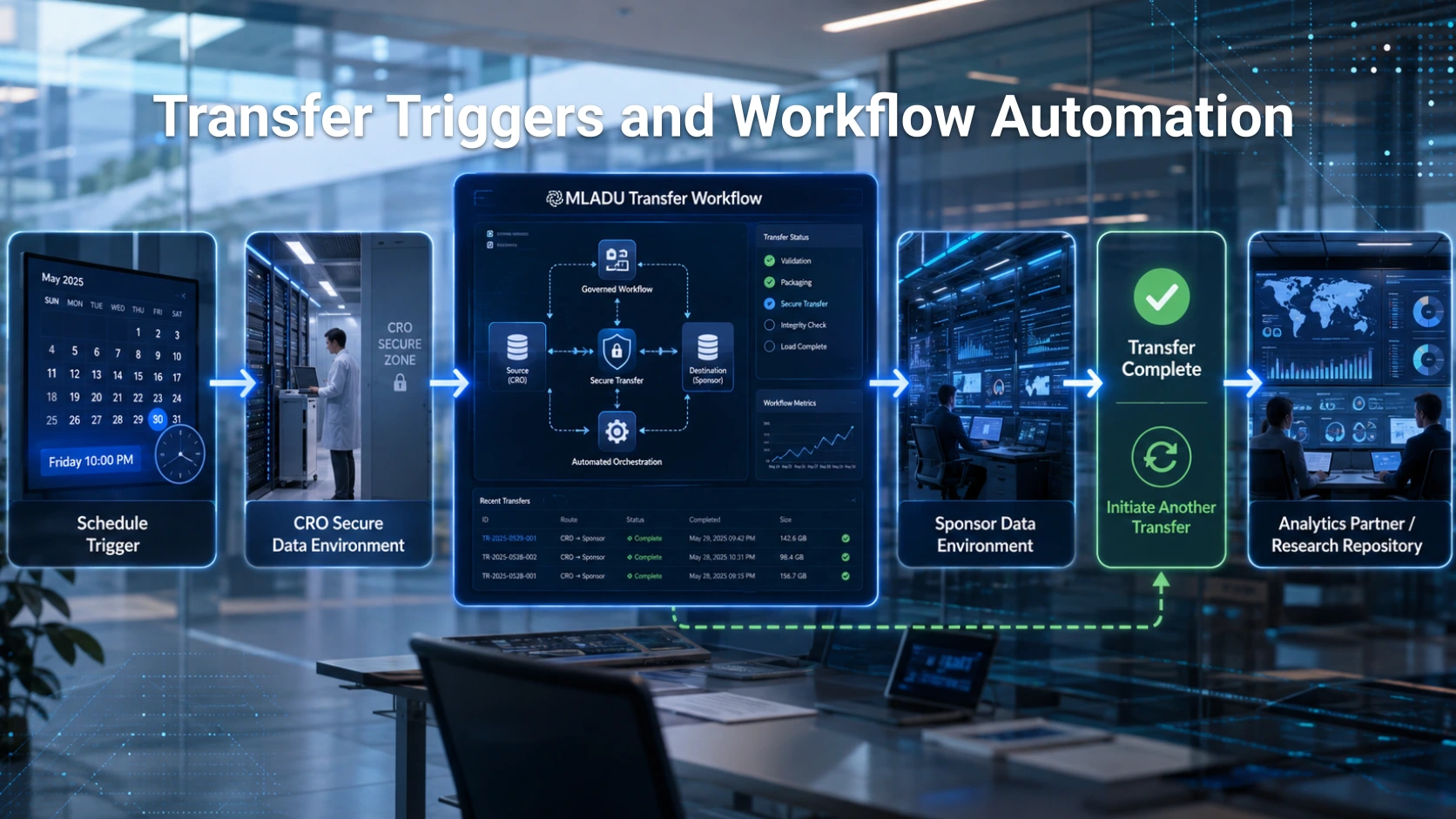
Example: A Scheduled Transfer That Automatically Starts Another Transfer
Consider a Contract Research Organization that prepares an updated clinical data package for a pharmaceutical sponsor every Friday.
The CRO needs to perform two related deliveries.
First, the finalized data must move from the CRO's controlled environment to the sponsor's primary research environment.
After that transfer is successfully completed, a second approved copy must be delivered to a separate analytics environment used by another authorized partner.
Without transfer triggers, the workflow might look like this:
- An employee waits until Friday evening.
- The employee manually starts the sponsor transfer.
- Someone monitors the transfer.
- Someone confirms that it is completed.
- Someone manually starts the second transfer.
- The partner waits for the second delivery.
- Personnel manually communicate completion.
MLADU triggers allow this workflow to operate differently.
Step 1: Schedule Trigger
The first transfer is configured with a time-based schedule trigger.
Every Friday at the approved delivery time, MLADU initiates the data transfer from the CRO source environment to the sponsor's target data station.
Scheduled Trigger → CRO → Sponsor
Step 2: MLADU Performs the Transfer
MLADU moves the approved data according to the configured transfer workflow.
The transfer remains subject to the organization's applicable MLADU security, governance, integrity, audit, and approval controls.
Step 3: Transfer Completion Becomes the Next Trigger
When the CRO-to-sponsor transfer completes successfully, the completion event is configured to initiate another transfer.
The first transfer therefore becomes the trigger for the next stage.
Transfer 1 Complete → Initiate Transfer 2
Step 4: Second Transfer Begins
MLADU initiates the second approved transfer from the applicable source data station to the partner analytics environment.
The complete workflow becomes:
Friday Schedule → CRO Data → Sponsor → Transfer Complete → Second Transfer → Analytics Partner
The organization no longer needs someone to manually watch the first transfer and remember to start the second one.
The completion of one governed transfer automatically advances the approved workflow.
Building Automated Data-Sharing Pipelines
Chained transfers can become the foundation for more sophisticated data-sharing workflows.
For example:
Data Available → Transfer to Central Repository → Transfer Complete → Transfer to Analysis Environment
Or:
Scheduled Release → Sponsor Delivery → Transfer Complete → CRO Archive Delivery
Or:
User Initiates Transfer → Research Consortium → Transfer Complete → Member Institution Transfer
Another workflow might combine several completion mechanisms:
Scheduled Transfer → Transfer Complete → Initiate Next Transfer → Final Transfer Complete → Webhook → Downstream Processing
These workflows allow data movement to participate directly in larger organizational automation processes.
Why Triggers Are Valuable for CROs
Contract Research Organizations frequently operate at the intersection of sponsors, laboratories, research sites, technology vendors, analytics partners, and regulatory processes.
A CRO may need to receive, organize, and redistribute data across several approved destinations.
This makes transfer workflow management an important operational capability.
MLADU triggers can help CROs support repeatable data vending and delivery workflows.
A CRO might use MLADU to:
- Receive laboratory data when it becomes available
- Deliver weekly clinical updates to a sponsor
- Distribute approved data packages to participating partners
- Send completed transfers to downstream repositories
- Trigger analytic workflows after delivery
- Create recurring sponsor data deliveries
- Automate multi-stage delivery processes
- Notify authorized stakeholders after each delivery
- Reduce manual transfer administration
For a CRO performing frequent data deliveries, the benefit increases with every repeated transfer.
Data Vending as a Managed Workflow
Data vending is often treated as a file delivery task.
Operationally, it can be much more complicated.
A CRO may need to determine:
- When a data package is ready
- Whether it has been approved for release
- Which sponsor or partner should receive it
- Which destination should be used
- When delivery should occur
- Whether another copy must be sent elsewhere
- Who should be notified
- Which downstream process should begin
MLADU triggers help transform these decisions into repeatable workflows.
Once the appropriate governance and transfer configuration have been established, the organization can reduce the manual effort required to execute each delivery.
Why Triggers Matter for Research Consortia
Research consortia frequently depend on data arriving from many organizations.
Different sites may use different submission schedules.
Some transfers may occur when new data becomes available.
Others may occur monthly or quarterly.
Some deliveries may need to be redistributed from a coordinating center to another approved destination.
MLADU triggers allow a consortium to support these different patterns within a consistent transfer-management framework.
For example:
Site Data Available → Transfer to Coordinating Center → Completion → Transfer to Analysis Repository
The consortium can automate portions of this process while maintaining the appropriate governance controls.
Event-Driven Data Transfer
Traditional file transfer processes are often task-driven.
Someone must perform an action to make the next step happen.
MLADU triggers enable a more event-driven data transfer model.
In an event-driven workflow:
- A scheduled time can become an event
- Data becoming available can become an event
- A user's request can become an event
- A completed transfer can become an event
Each event can cause the appropriate next step to occur.
This allows organizations to create data movement workflows that react to what is actually happening rather than depending entirely on manual intervention.
Reducing Human Dependency Without Removing Human Governance
Automation should not mean uncontrolled data movement.
MLADU triggers are intended to help automate approved workflows, not bypass organizational controls.
An organization may still require:
- Authorized users
- Approved sources and targets
- Data transfer agreements
- Transfer approvals
- Role-based access
- Security requirements
- Data handling requirements
- Audit trails
- Transfer manifests
- Integrity verification
- Exception management
Triggers determine when an approved process advances.
They do not eliminate the governance surrounding that process.
This distinction is important for research, healthcare, life sciences, and other organizations handling sensitive or valuable data.
Human and Automated Triggers Can Work Together
Not every workflow should be fully automated.
Some transfers benefit from human initiation.
Others benefit from scheduling.
Others should occur only when the data is actually available.
MLADU allows organizations to select the trigger that best fits each transfer workflow.
For example:
A researcher might initiate an unusual one-time transfer through the portal.
A monthly sponsor delivery might be schedule-driven.
A sequencing delivery might be data-availability-driven.
A completed transfer might then use a webhook to notify another system.
This flexibility allows organizations to automate where appropriate while preserving human involvement where it adds value.
Transfer Triggers and MLADU Concierge
MLADU Concierge is particularly important when an automated transfer depends on real-world coordination.
A calendar cannot determine why a laboratory has delayed a release.
A script cannot necessarily determine whether a partner's data package has received the appropriate organizational approval.
A recurring job may not know that the source contact changed.
MLADU Concierge helps bridge these operational gaps.
For email- and data-availability-driven workflows, Concierge can work with the organizations involved to determine when the transfer is actually ready to proceed.
This provides a combination of human coordination and automated execution.
Transfer Triggers and Data Transfer Manifests
Automation increases the importance of documentation.
When transfers occur without someone manually initiating and observing each step, organizations need reliable records describing what occurred.
MLADU data transfer manifests can complement trigger-based workflows by documenting file-level transfer activity.
Together:
- Triggers document why or when the workflow advanced
- Transfer status provides operational visibility
- Audit records document platform activity
- Manifests provide file-level evidence of transfer outcomes
This helps organizations automate data movement without turning the process into a black box.
From File Transfer to Data Workflow Orchestration
Moving data is important.
Managing what causes the data to move and what should happen afterward can be even more important.
MLADU transfer triggers allow organizations to connect data movement to:
- People
- Schedules
- Data availability
- External applications
- Subsequent transfers
This transforms a transfer from an isolated technical task into part of a larger governed workflow.
A transfer can begin when data becomes available.
It can begin according to an approved delivery schedule.
Its completion can notify stakeholders.
Its completion can invoke another application.
Its completion can automatically start another transfer.
For organizations exchanging data repeatedly across research sites, CROs, sponsors, laboratories, repositories, cloud environments, and partners, these capabilities can significantly reduce manual coordination while improving consistency and operational continuity.
Automate the Handoffs Between Data Transfers
Successful data sharing involves more than getting files from Point A to Point B.
The organization also needs to manage when Point A should begin, who needs to know when it reaches Point B, and whether the data needs to continue to Point C.
MLADU triggers help manage those handoffs.
By combining flexible transfer initiation with configurable completion actions, MLADU allows organizations to build governed, repeatable, and increasingly automated data-sharing workflows while retaining visibility and control.
Topics
ON THIS PAGE
ASK A QUESTION
Can't find what you're looking for? Our team is here to help.


Try MLADU Free
Experience the power of AI powered data transfers.

No credit card required